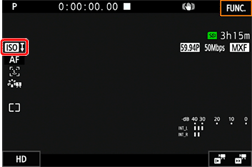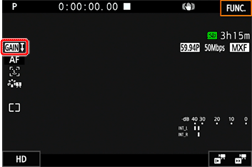
Automatic Gain and ISO Limits (XC15)
Solution
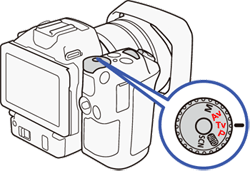
Depending on the brightness of the surroundings, the camcorder will automatically raise the gain or ISO speed to try to get a brighter picture. Because doing so can lead to video noise, you can select a maximum limit for how high levels are raised. These limits are referred to as the automatic gain control (AGC) limit and auto ISO limit. Shooting with a smaller limit is useful as it results in a darker picture but less noise. This function is available when the shooting mode is set to [ Av ] , [ Tv ] or [ P ].
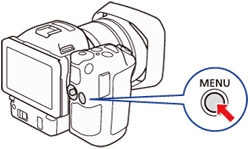
2. Touch [  : Camera Setup ] -> [ISO / Gain].
: Camera Setup ] -> [ISO / Gain].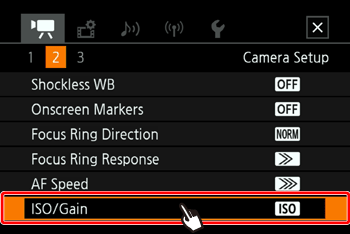
3. Select the desired option.
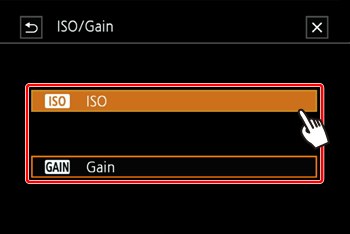
4. Touch [  ].
].
].5. Open the submenu to set the AGC limit or auto ISO limit.
- 5-1. Selected [ISO]:
Touch [  : Camera Setup ] -> [Auto ISO Limit].
: Camera Setup ] -> [Auto ISO Limit].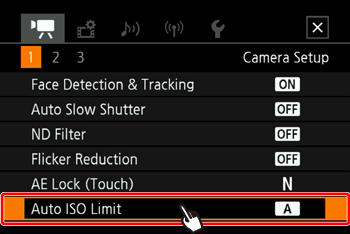
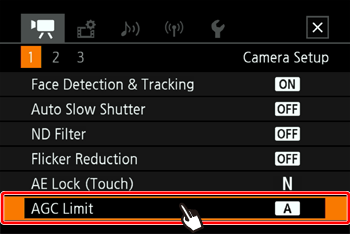
- 5-3. [
 ] mode:
Touch [  : Camera Setup ] -> [Auto ISO Limit].
: Camera Setup ] -> [Auto ISO Limit].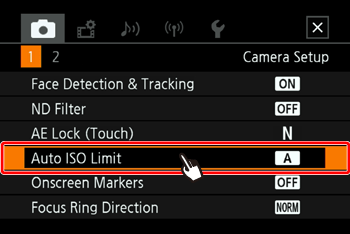
NOTE
- Because only the ISO speed can be adjusted for photos, you will be able to set only the auto ISO limit.
6. Touch [  ] or [
  ].
].
] or [ ].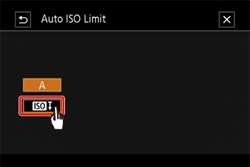
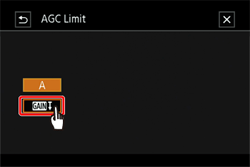
NOTE
- The AGC limit or auto ISO limit dial will appear at the bottom of the screen.
- Touch [A] to remove the limit.
7. Drag your finger left / right along the dial to select the desired value.
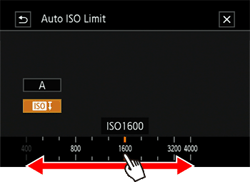
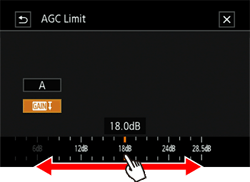
- You can also push the joystick up/down until the position of the current value is highlighted in orange and then push left/right to adjust the value.
8. Touch [  ].
].
].9. The AGC limit or auto ISO limit icon will appear on the left side of the screen.