
Assigning Commonly Used Functions to Buttons and Dials (PowerShot G3 X)
Solution
Reassign functions of the [  ] ring, [
  ] dial, or [
  ] dial, or assign common functions to the [
  ] button, [
  ] button, [
  ] button, or [
  ] button.
] ring, [ ] dial, or [ ] dial, or assign common functions to the [ ] button, [ ] button, [ ] button, or [ ] button.1. Press the power button to turn the camera on.
2. Press the [MENU] button.
3. Move the zoom lever to choose the [  ] tab.
] tab.Press the [  ], [
], [  ] buttons to choose [
  ].
].
], [ ] buttons to choose [ ].Press the [  ], [
], [  ] buttons to choose [Function Assignment], and then press the [
  ] button.
], [ ] buttons to choose [Function Assignment], and then press the [ ] button.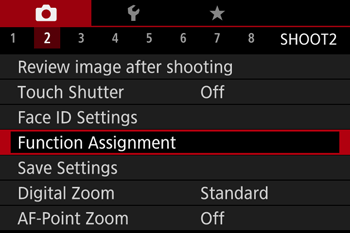
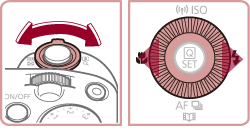
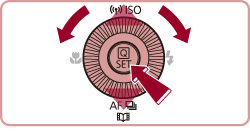
4. Press the [ ], [ ], [ ], [ ] buttons to choose the ring or button for assignment.
], [ ], [ ], [ ] buttons to choose the ring or button for assignment.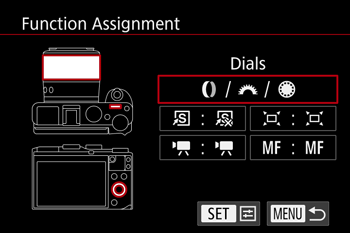
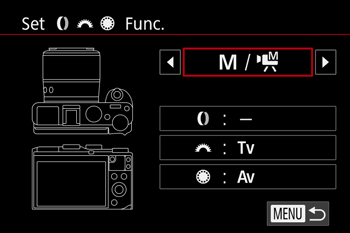
4-1. To assign functions to the [ ] ring [ ] dial or [ ] dial, press the [ ] button, press the [ ], [ ] buttons to choose the ring or dial on the screen displayed, and then press the [ ], [ ] buttons to choose the function.
] ring [ ] dial or [ ] dial, press the [ ] button, press the [ ], [ ] buttons to choose the ring or dial on the screen displayed, and then press the [ ], [ ] buttons to choose the function.Press the [MENU] button.

NOTE
- By assigning [
 ], in [
  ] mode you can set the shutter speed with the [ ] dial and the aperture value with the [ ] dial.
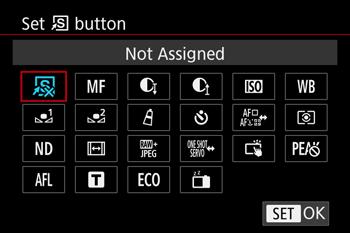
4-2. To assign functions to the ], [ ], [ ], or [ ] button, press the [ ] button, press the [ ], [ ], [ ], [ ] buttons to choose the function on the screen, and then press the [ ] button.
], [ ], [ ], or [ ] button, press the [ ] button, press the [ ], [ ], [ ], [ ] buttons to choose the function on the screen, and then press the [ ] button.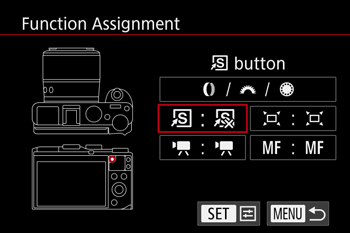
NOTE
- Press the button to activate the assigned function.
- To restore default functions to the [ ] button, [ ] button, [ ] button, or [ ] button, choose [
 ], [ ], [ ], or [ ].
 - Icons labeled with [×] indicate that the function is not available in the current shooting mode or under current function conditions.
With [  ], you can move and resize the AF frame by pressing the assigned button in [1-point AF] mode
], you can move and resize the AF frame by pressing the assigned button in [1-point AF] mode- With [
 ] or [
  ], each press of the assigned button records white balance data, and the white balance setting changes to [ ], [ ].
 - With [
 ], each press of the button that it is assigned to adjusts and locks the focus, and [ ] is displayed on the screen.
 - With [
 ], pressing the button that it is assigned to deactivates screen display. To restore the display, do any of the following.
-Press any button other than the power button.
-Hold the camera in another orientation.
-Raise or lower the flash.
-Either open the screen and rotate it toward the front, or close the screen if it is already open and facing the front.
- You can still record movies in [
 ], [ ], [
  ], or [
  ] mode even if you assign a function to the [ ] button.
You can quickly and easily activate functions that you assign to the [ ] button.
] button.1. Press the [  ] button to turn the camera on.
] button to turn the camera on.2. Press the [MENU] button.
3. Move the zoom lever to choose the [  ] tab.
] tab.Press the [ ], [ ] buttons to choose [  ].
].
], [ ] buttons to choose [ ].Press the [ ], [ ] buttons to choose [Set Shortcut button], and then press the [ ] button.
], [ ] buttons to choose [Set Shortcut button], and then press the [ ] button.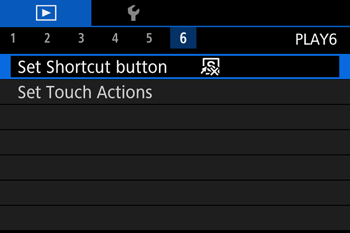
4. Press the [ ], [ ] buttons to choose a function to assign, and then press the [ ] button. When you have completed all the desired settings, press the [MENU] button to return to the playback screen.
], [ ] buttons to choose a function to assign, and then press the [ ] button. When you have completed all the desired settings, press the [MENU] button to return to the playback screen.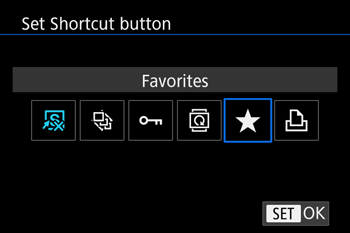
5. Press the [ ] button to activate the assigned function.
] button to activate the assigned function.REFERENCE
- To restore default settings, choose [
 ].
]. - Pressing the ] button with [
 ] assigned when the camera is not connected to a printer adds the image to the print list. When the camera is connected to a printer, pressing the button starts printing.