
Reverting the Camera to the Default Settings (EOS 5DS / EOS 5DS R)
Solution
The camera’s shooting function settings and menu settings can be reverted to their defaults.
1. Set the power switch to [ON].
2. Press the [MENU] button to display the menu screen.
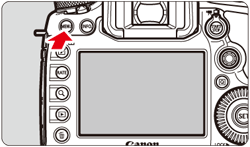
3. Press the [  ] button and select the [
  ] tab.
] button and select the [ ] tab.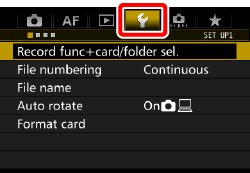
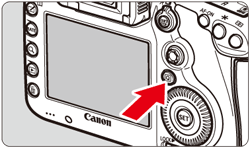
4. Turn the [  ] dial and select the [
  ] tab.
] dial and select the [ ] tab.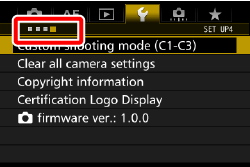
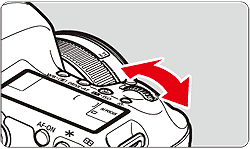
5. Turn the [  ] dial to select [Clear all camera settings], then press [
  ].
].
] dial to select [Clear all camera settings], then press [ ].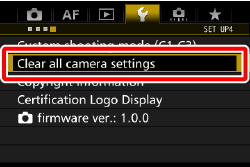
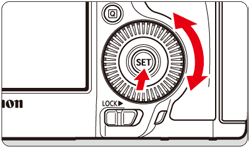
6. Turn the [ ] dial to select [OK], then press [ ].
] dial to select [OK], then press [ ].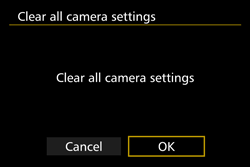
- Setting [Clear all camera settings] will reset the camera to the following default settings:
| Shooting Function Settings | |||
|---|---|---|---|
| AF operation | One-Shot AF | HDR Mode | Disable HDR |
| AF area selection mode | Single-point AF (Manual Selection) | Interval timer | Disable |
| AF point selection | Center | Bulb timer | Disable |
| Registered AF point | Canceled | Anti-flicker shooting | Disable |
| Metering mode |  (Evaluative metering) (Evaluative metering) | Mirror lockup | Disable |
| ISO speed | Auto | Viewfinder display | |
| ISO speed range | Minimum limit: 100 | Electronic level | Hide |
| Maximum limit: 6400 | Grid display | Hide | |
| Auto ISO range | Minimum limit: 100 | Show/hide in viewfinder | Only Flicker selected |
| Maximum limit: 3200 | Custom Functions | Unchanged | |
| Minimum shutter speed | Auto | External Speedlite control | |
| Drive mode |  (Single shooting) (Single shooting) | Flash firing | Enable |
| Exposure compensation/AEB | Canceled | E-TTL II flash metering | Evaluative flash metering |
| Flash exposure compensation | Canceled | Flash sync. speed in Av mode | Auto |
| Multiple exposure | Disable | ||
| AF Settings | |||
|---|---|---|---|
| Case 1 - 6 | Case1/Parameter settings of all cases cleared | AF area selection method | M-Fn button |
| AI Servo 1st image priority | Equal priority | Orientation linked AF point | Same for both vertical/horizontal |
| AI Servo 2nd image priority | Equal priority | Initial AF point,  AI Servo AF AI Servo AF | Auto |
| Lens electronic MF | Enable after One-Shot AF | Automatic AF point selection: EOS iTR AF | Enable |
| AF-assist beam firing | Enable | Manual AF point selection pattern | Stops at AF area edges |
| One-Shot AF release priority | Focus priority | AF point display during focus | Selected (constant) |
| Lens drive when AF impossible | Continue focus search | VF display illumination | Auto |
| Selectable AF point | 61 points | AF point during AI Servo AF | Non illuminated |
| Select AF area selection mode | All items selected | AF Microadjustment | Disable/Adjustment amount retained |
| Image Recording Settings | |||
|---|---|---|---|
| Image quality |  | White balance bracketing | Canceled |
| Crop/aspect ratio | Full-frame | Color space | sRGB |
| Picture Style | Standard | Long exposure noise reduction | Disable |
| Auto Lighting Optimizer | Standard | High ISO speed noise reduction | Standard |
| Lens aberration correction | Highlight tone priority | Disable | |
| Peripheral illumination correction | Enable/Correction data retained | Record function | Standard |
| Chromatic aberration correction | Enable/Correction data retained | File numbering | Continuous |
| White balance |  (Ambience priority) (Ambience priority) | File name | Preset code |
| Custom White Balance | Canceled | Auto cleaning | Enable |
| White balance shift | Canceled | Dust Delete Data | Erased |
| Camera Settings | |||
|---|---|---|---|
| Auto power off | 1 min. | LCD brightness | Auto |
| Beep | Enable | Date/Time/Zone | Unchanged |
| Release shutter without card | Enable | Eye-Fi settings | Disable |
| Image review time | 2 sec. | Language | Unchanged |
| Highlight alert | Disable | Video system | Unchanged |
| AF point display | Disable |  button display options button display options | All items selected |
| Playback grid | Off | Custom Quick Control | Unchanged |
| Histogram display | Brightness |  button function button function | Rating |
| Movie playback count | Unchanged | Custom shooting mode | Unchanged |
| Magnification (Approx.) | 2x (magnify from center) | Copyright information | Unchanged |
| Control over HDMI | Disable | Configure: MY MENU | Unchanged |
| Image jump w/ |  (10 images) (10 images) | Menu display | Normal display |
| Auto rotate | On 
 | ||
| Live View Shooting Settings | |||
|---|---|---|---|
| Live View shooting | Enable | Exposure Simulation | Enable |
| AF method |  +Tracking +Tracking | Silent LV shooting | Mode 1 |
| Continuous AF | Disable | Metering timer | 8 sec. |
| Grid display | Off | ||
| Movie Shooting Settings | |||
|---|---|---|---|
| Movie Servo AF | Disable | Time code | |
| AF method | +Tracking | Count up | Unchanged |
| Grid display | Off | Start time setting | Unchanged |
| Movie recording size | NTSC : 

 | Movie recording count | Unchanged |
PAL :

| Movie playback count | Unchanged | |
| Sound recording | Auto | Drop frame | Unchanged |
| Wind filter | Disable | Silent control | Disable  |
| Attenuator | Disable |  button function button function |  / / |
| Silent LV shooting | Mode 1 | Time-lapse movie | Disable |
| Metering timer | 8 sec. | ||