
Assigning Regularly Used Functions to the [RING FUNC] and [Movie] Buttons (PowerShot G7 X)
Solution
You can quickly and easily activate functions that you assign to the [  ] or movie button (
 ).
).
] or movie button ().The procedure is explained below.
IMPORTANT
- The following section explains the setting procedures when the camera’s shooting mode has been set to [Program AE] (
 ).
).
1. Press the <Power> button to turn the camera on.
2. Press the <MENU> button.
3. On the [  ] tab, press the <
 ><
>< > buttons or turn the <
 > dial to choose [ Set button] or [ Set button] on the, and then press the <
 > button
] tab, press the <><> buttons or turn the <> dial to choose [ Set button] or [ Set button] on the, and then press the <> button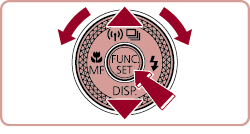
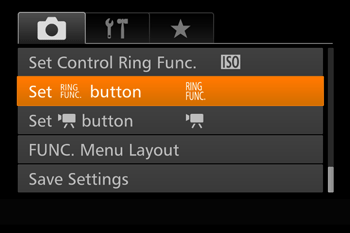
- [ Set button] has been chosen in the example image above.
4. The following screen appears.
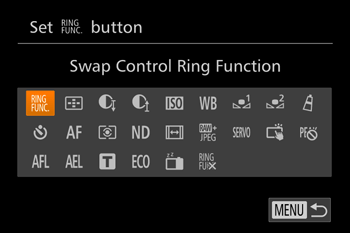
5. Press the <><>< ><
>< > buttons or turn the <> dial to choose a function to assign, and then press the <> button.
><><><> buttons or turn the <> dial to choose a function to assign, and then press the <> button.6. Use the assigned function as needed.
To activate an assigned function, press the button you assigned it to.
REFERENCE
- To restore default settings, choose [ ] in Set button] and [ ] in [ Set button].
- Icons labeled with [
 ] indicate that the function is not available in the current shooting mode or under current function conditions.
 - With [
 ], you can move and resize the AF frame by pressing the assigned button in [1-point] AF frame mode.
 - With [
 ] or [
  ], each press of the assigned button records white balance data, and the white balance setting changes to [ ] or [ ].
 - With [
 ], each press of the assigned button adjusts and locks the focus. [ ] is then displayed.
 - With [
 ], pressing the assigned button deactivates screen display. To restore the display, do any of the following.
-- Press any button other than the power button
-- Hold the camera in another orientation
-- Open or close the screen
-- Raise or lower the flash
- You can still record movies in [
 ], ],
], ],  ], or
], or  ] mode even if you assign a function to the movie button.