
Usable Paper
Solution
The following shows the paper sizes that can be used with this printer.
 : Available
 : Unavailable
| Paper Type | Setting for [Paper Type]*1 | Paper Size | Paper Source | 2-sided Printing*2 | ||
| Multi-purpose Tray | Drawer 1 | Drawer 2 (optional) | ||||
| Plain paper*3 (60 to 90 g/㎡) | [Plain] (Default) [Plain L]*4 | A4 | | | | |
| B5 | | | | | ||
| A5 | | | | | ||
| A6 | | | | | ||
| Legal | | | | | ||
| Letter | | | | | ||
| Executive | | | | | ||
| Statement | | | | | ||
| 16K | | | | | ||
| Custom size paper | *5 | *6 | *6 | | ||
| Heavy paper (91 to 150 g/㎡) | [Heavy 1] | A4 | | *7 | *7 | *7 |
| B5 | | *7 | *7 | | ||
| A5 | | *7 | *7 | | ||
| A6 | | *7 | *7 | | ||
| Legal | | *7 | *7 | *7 | ||
| Letter | | *7 | *7 | *7 | ||
| Executive | | *7 | *7 | | ||
| Statement | | | | | ||
| 16K | | | | | ||
| Custom size paper | *5 | *6 *7 | *6 *7 | | ||
| Heavy paper (151 to 163 g/㎡) | [Heavy 2] | A4 | | | | |
| B5 | | | | | ||
| A5 | | | | | ||
| A6 | | | | | ||
| Legal | | | | | ||
| Letter | | | | | ||
| Executive | | | | | ||
| Statement | | | | | ||
| 16K | | | | | ||
| Custom size paper | *5 | | | | ||
| Transparency | [Transparency] | A4 | | | | |
| Letter | | | | | ||
| Label | [Labels] | A4 | | | | |
| B5 | | | | | ||
| A5 | | | | | ||
| A6 | | | | | ||
| Legal | | | | | ||
| Letter | | | | | ||
| Executive | | | | | ||
| Statement | | | | | ||
| 16K | | | | | ||
| Custom size paper | *5 | | | | ||
| Index Card | [Envelope] | Index Card | | | | |
| Envelope | [Envelope] | Envelope Monarch | | | | |
| Envelope No.10 | | | | | ||
| Envelope DL | | | | | ||
| Envelope ISO-C5 | | | | | ||
| Envelope ISO-B5 | | | | | ||
*1 The setting is located in the [Paper Source] sheet in the printer driver. If you print from DOS, UNIX, or other operating system, specify a paper type in [Default Paper Type] in the control panel.
*2 2-sided printing supports paper with a weight of 60 to 120 g/㎡
*3 Recycled paper can be also used.
*4 If the printed paper curls (the printed side curls outward) when printed with [Plain] selected, select [Plain L].
*5 You can load custom size paper that is 76.2 to 215.9 mm wide and 127.0 to 355.6 mm long. (If you are using the UFR II printer driver, you can load custom size paper that is 127.0 to 215.9 mm wide and 127.0 to 215.9 mm long in landscape orientation.)
*6 You can load custom size paper that is 105.0 to 215.9 mm wide and 148.0 to 355.6 mm long. (If you are using the UFR II printer driver, you can load custom size paper that is 148.0 to 215.9 mm wide and 148.0 to 215.9 mm long in landscape orientation.)
*7 You can load 91 to 120 g/㎡ heavy paper.
IMPORTANT
About print speed
- The print speed may slow depending on the paper settings for the size, type, orientation, and number of copies.
- When continuously printing paper whose length is 269.3 mm or less, the print speed may slow gradually.
- When continuously printing paper whose width is 189.9 mm or less, the print speed may slow gradually.
Precautions for paper
- See the "e-Manual" (HTML manual) in the CD-ROM supplied with the printer.
When using labels or envelopes
- Using the following types of paper may result in paper jams that are difficult to clear or may result in damage to the printer.
- Peeled labels or partly used labels
- Coated labels that are easily peeled off from the backing sheet
- Labels with uneven adhesive
- Envelopes with fasteners or snaps
- Envelopes with address windows
- Envelopes with adhesive on the surface
- Wrinkled or creased envelopes
- Poorly manufactured envelopes in which the glued parts are uneven
- Irregularly-shaped envelopes
NOTE
Printable area
- See the "e-Manual" (HTML manual) in the CD-ROM supplied with the printer.
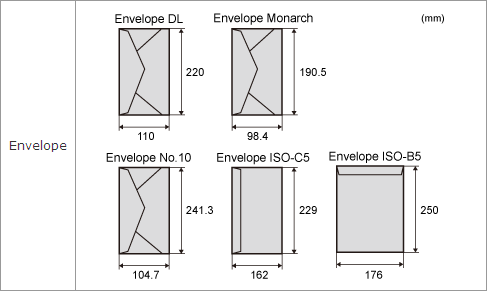
Envelope sizes
- The envelope sizes are as follows.
Chlorine-free paper
- Chlorine-free paper can be used with this printer.