
Images are blurry or not in focus
Solution
When an image is blurry or cannot be brought into focus during shooting, please check the following.
You can prevent camera shake by holding the camera firmly.
Keep your arms tight against your body while holding the camera firmly by the sides. Be sure that your fingers do not block the <flash>.

When you press the <Shutter Button> halfway in low light conditions where camera shake is likely, a flashing ( ) will appear.
) will appear.Follow the instructions below and be careful not to shake the camera.
- Set the [IS mode] to [Continuous].
Press the < > button and select the [Shooting] tab (
 ), and then set the [IS mode] to [Continuous].
> button and select the [Shooting] tab (), and then set the [IS mode] to [Continuous].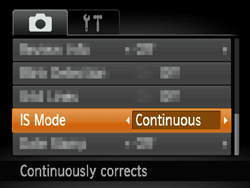
NOTE
When the [Shooting mode] is in <AUTO> ( ) mode, the [IS mode] will automatically be set to [Continuous].
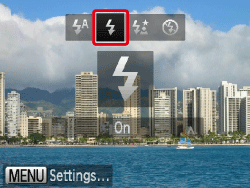
) mode, the [IS mode] will automatically be set to [Continuous].- Set the flash to [On] (
 ).
).
Press the <flash> button (to the right of the <directional button>) several times to set to [On] ().
).
- Increase the [ISO speed].
Operate the <FUNC./SET> button ( ) and <directional button> to set the desired [ISO speed].
) and <directional button> to set the desired [ISO speed].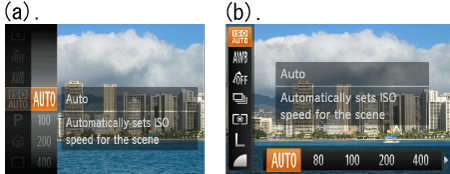
- Attach the camera to a tripod.
Additionally, you should set the [IS Mode] to [Off] when shooting with a tripod.
- Press the <Shutter Button> halfway to focus on the subject, then press fully to shoot.
Half-press the <Shutter Button> (press lightly to focus), and then press it fully (without releasing the <Shutter Button>, press it all the way down).

- Shoot the subject within the focusing distance.
- Set the [AF-assist Beam] to [On].
Press the <> button, select the [Shooting] tab (), and then set the [AF-assist Beam] to [On].
> button, select the [Shooting] tab (), and then set the [AF-assist Beam] to [On].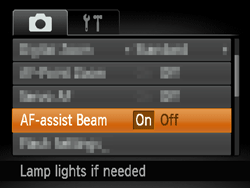
- Confirm that functions which you do not intend to use (macro, etc.) are not set.
Press the <Macro> button ( ) several times to select a suitable [Focusing Range].
) several times to select a suitable [Focusing Range].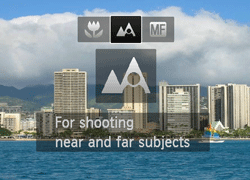
- Shoot using the focus lock or AF lock
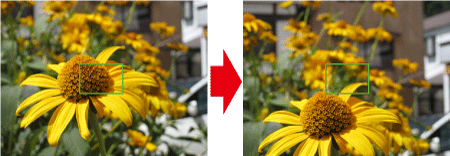
- Focus Lock
Change the composition while holding the <Shutter Button> down halfway.
- AF Lock
Keep the <Shutter Button> pressed halfway and press the left <directional button>.
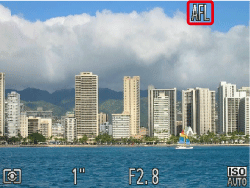
The focus locks, and ( ) appear on the screen. (On the PowerShot SX230 HS / SX220 HS, (
 ) and the [MF indicator] appears.)
) appear on the screen. (On the PowerShot SX230 HS / SX220 HS, () and the [MF indicator] appears.)If you center on the light and dark contrasting area of the subject and push the <Shutter Button> halfway, or repeatedly push the <Shutter Button> halfway, the [AF frame] will appear and the camera will focus.
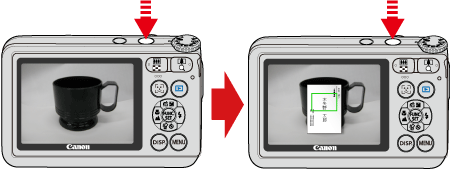
NOTE
- The camera may not be able to focus in some conditions.
 ... The ISO speed can be set.
 ... The camera does not have this shooting mode.
| Model | Shooting modes in which the ISO speed setting can be made | Focusing zone | ||||||
|---|---|---|---|---|---|---|---|---|
| Screen display |  |  |  |  |  |  |  )) )) | |
| PowerShot ELPH 100 HS / IXUS 115 HS |  | | | | | | | [Normal] 3cm (1.2 in.) – infinity (W)* / 50cm (1.6 ft.) – infinity (T)** [Macro] 3 – 50 cm (W) (1.2 in. – 1.6 ft. (W)) |
| PowerShot ELPH 300 HS / IXUS 220 HS | | | | | | | | [Normal] 3cm (1.2 in.) – infinity (W) / 90cm (3.0 ft.) – infinity (T) [Macro] 3 – 50 cm (W) (1.2 in. – 1.6 ft. (W)) |
| PowerShot A3300 IS PowerShot A3200 IS |  | | | | | | | [Normal] 3.0cm (1.2 in.) – infinity (W) / 90cm (3.0 ft.) – infinity (T) [Macro] 3 – 50 cm (W) (1.2 in. – 1.6 ft. (W)) |
| PowerShot SX230 HS PowerShot SX220 HS | | | | | | | | [Normal] 5cm (2.0 in.) – infinity (W) / 1 m (3.3 ft.) – infinity (T) [Macro] 5 – 50 cm (W) (2.0 in. – 1.6 ft. (W)) |
 ) to the maximum wide angle side (Max. wide angle).
** (T): When turning the
 ) to the maximum telephoto side (Max. telephoto).