
How do I add the date and time to my pictures?
Solution
These instructions explain how to insert the date in images.
CAUTION
- To select the items displayed on camera's LCD monitor,
 press the button shown below (right, left, up, and down). To specify the selected item,
  press the button.
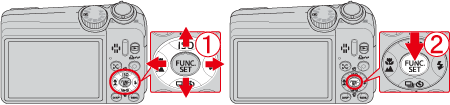
- The [Date Stamp] cannot be deleted from the image data once it has been recorded because the date is written in as an image.
- When selecting [Date Stamp] , [Recording Pixels] is set to 1600 x 1200 pixels and the compression (image quality) to [Fine].
- Screens or menu listings may differ depending on the camera model being used.
- As the actual locations of buttons / switches on cameras vary depending on the camera model, the illustrations that appear on this page may differ from your camera.
- When the shooting mode is set to <Movie> (
 ) or <Easy mode> (
 ), settings for inserting the date and time cannot be made.
 - When the shooting mode is set to [ISO 3200] (
 ) under <SCN> (
 ), settings for inserting the data and time cannot be made.
1. Set the <Mode Dial> to a setting other than <Movie> () or <Easy Mode> (), and press the <Power> button.
Set the <Mode Dial> to a setting other than <Movie> () or <Easy Mode> (), and press the <Power> button.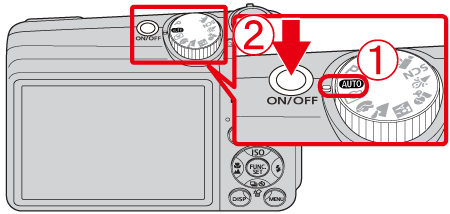
2. Press the <FUNC./SET> ( ) button.
) button.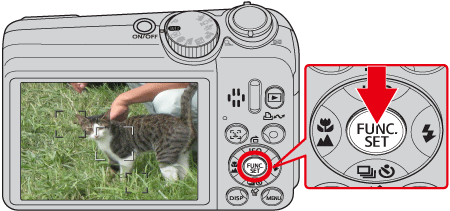
3. A screen like the one below will appear on the monitor.
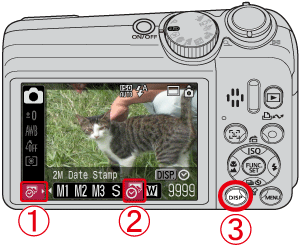
Select [Date Stamp] ( ) in the [Recording Pixels] section .
[Date Stamp] () in the [Recording Pixels] section . Press the <DISP.> (
 ) button.
4. A screen like the one below will appear on the monitor.
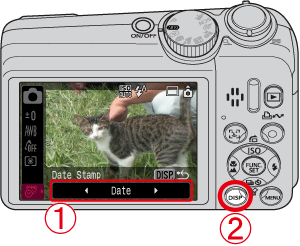 Press the camera button as shown above (right and left), select [Date Stamp] and set it to [Date] or [Date & Time]. Press the <DISP.> () button.
5. Press the <FUNC./SET> ( ) button.
) button.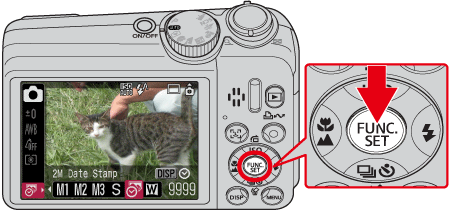
6. Make sure that the [Date Stamp] is set and the following screen will appear with the icon ( ) in the lower-left corner of the screen.
) in the lower-left corner of the screen.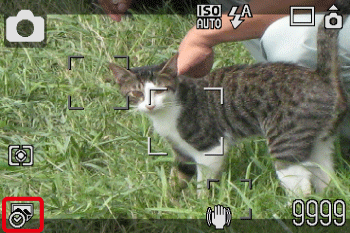
7. When shooting with this setting, the date will be embedded in the image as shown below.
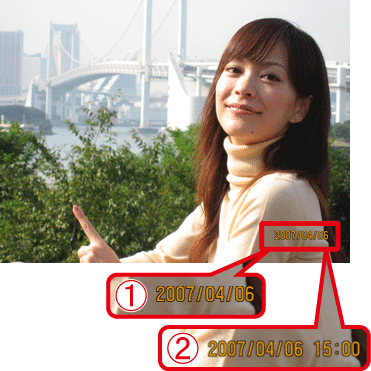 [Date] [Date & Time]
WARNING
The date, its font and color, and the position where it is displayed cannot be changed. Also, dates and times recorded with [Date Stamp] cannot be deleted.